
Solution guide · AI & automation
GoHighLevel Voice AI agent not working? Why it fails and how to fix it
GoHighLevel Voice AI agent not answering calls, booking appointments or transferring? Every common cause and the exact settings that fix it.

Key takeaways
- Most “Voice AI not working” reports are routing problems: the number is not assigned on the Deploy tab, working hours exclude the call, or the ring timeout lets carrier voicemail answer before the agent does.
- If an agent talks but never books, the Appointment Booking action is missing, not linked to a calendar, or the calendar itself has no bookable slots — the agent can only offer what the calendar allows.
- Call transfers cannot be tested in a Web Call; test them with a real phone call and read the execution timeline in the call logs to see the failed step.
- Wrong answers usually come from a knowledge base whose “when to use” trigger never matches, or a prompt with conflicting rules — not from the AI model itself.
- Outbound Voice AI calls need your own documented consent: the FCC treats AI-generated voices as artificial voices under the TCPA, and HighLevel blocks or fails calls that break its safeguards.
When a GoHighLevel Voice AI agent “isn’t working”, the AI is rarely the problem. In almost every account I look at, the call never reaches the agent (a routing or timeout setting sends it somewhere else), or the agent answers but has no working action to finish the job: no linked calendar, a transfer number that was never filled in, or a knowledge base it never searches.
This guide goes through the five failures I see most: the agent does not answer, does not book, cannot transfer, gives wrong answers, and outbound calls fail. Each one gets its cause and the exact settings to fix it, checked against HighLevel’s help centre as of October 2026. If you would rather have it built properly from the start, that is what my AI automation and Voice AI service covers.
Start here: find which part of the call is failing
Before changing anything, open the agent’s call logs. HighLevel’s Voice AI call logs show an execution timeline for each call, with the actions triggered, failed steps and transfer events. That tells you which section below to read.
| Symptom | Most likely cause | Section |
|---|---|---|
| Phone rings out, or caller reaches voicemail | Number not assigned, working hours, or ring timeout too long | Agent does not answer |
| Agent chats but nothing appears in the calendar | Appointment Booking action missing or calendar has no slots | Agent does not book |
| “Let me transfer you” then the call drops | Transfer number missing, transfer loop, or tested in a Web Call | Transfers fail |
| Agent invents prices or policies | Knowledge base trigger never matches, conflicting prompt rules | Wrong answers |
| Agent goes quiet, then hangs up | Idle reminder and call-duration settings | Wrong answers |
| Outbound calls show as failed or blocked | Consent, DND, calling hours or safeguards | Outbound calls fail |
- 1Assign the numberDeploy > Phone, right number or pool.
- 2Shorten the ringBeat voicemail: 1–3 seconds in backup mode.
- 3Add the booking actionPoint it at a calendar with open slots.
- 4Fix the transferFull number, no loops, test a real call.
- 5Ground the answersOne knowledge base and a no-guessing rule.
Why the Voice AI agent does not answer calls
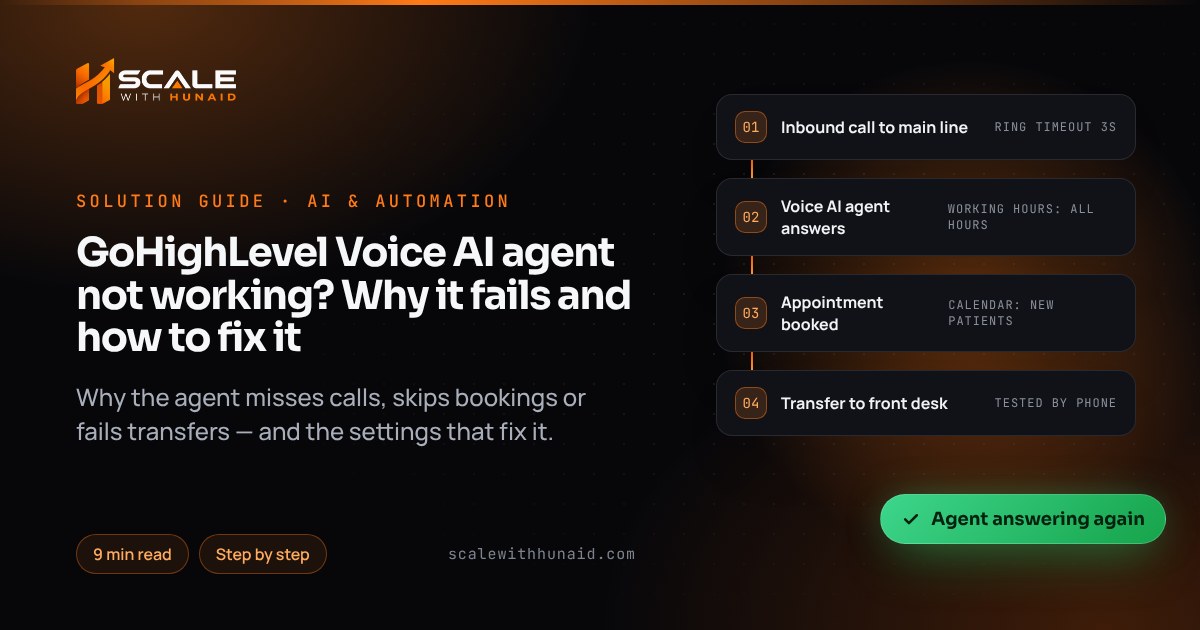
HighLevel says it plainly: assigning a number does not guarantee the agent answers every call. Working hours, the call routing mode, forwarding, the timeout, voicemail and the number’s own call flow all decide where the call goes. The usual culprits:
- The number is not assigned to this agent. It may be on a different agent, or not assigned at all.
- Working hours exclude the call. An agent on a custom schedule ignores calls outside it.
- The routing mode is wrong. “Use as Backup” only answers when the primary path does not.
- The ring timeout is too long. If the caller reaches local voicemail, HighLevel marks the call completed and the Voice AI agent will not answer it. This is the cause behind most “it worked in testing but not for real calls” reports.
The fix
- Go to AI Agents > Voice AI > Agents, open the agent and select Deploy > Phone, following HighLevel’s deploy steps. Select the correct phone number or Number Pool. If you use a Twilio number, follow HighLevel’s Twilio number guide first.
- Set Call Routing: choose Answer Calls Directly if the agent should take every call, or Use as Backup if staff answer first.
- Set Working Hours to All Hours, or a Custom Schedule that matches when you want the agent live — see HighLevel’s working hours article. Check the time zone matches the business.
- Go to Settings > Phone System > Phone Numbers, open the number’s Edit Configuration, and check forwarding and the incoming call timeout. For backup mode, HighLevel’s Voice AI call flow article recommends a low timeout of about 1–3 seconds, or 0 seconds when the agent should answer straight away. Its general inbound routing article uses about 20 seconds as a starting point for human-first routing, and says to set it below the time the external carrier’s voicemail takes to answer.
- Ring the number from a phone that is not the forwarding phone, both inside and outside working hours, and confirm the right agent answers each time.
High call volume is very unlikely to be your problem: Voice AI-connected numbers only hit a rate limit above 200 inbound calls a minute.
Why the Voice AI agent does not book appointments
An agent can only book through the Appointment Booking action, and it can only offer times the linked calendar allows. HighLevel’s booking article is explicit that the agent’s working hours control when it answers calls, while the calendar’s availability, buffers, minimum notice and conflict settings control which times can be booked. A fully booked calendar, a 48-hour minimum notice or a missing team member all look like “the AI won’t book”.
The fix
- Open the agent, go to its actions and add Appointment Booking if it is not there. Select the HighLevel calendar it should book into.
- Open that calendar and check its availability, minimum scheduling notice, buffers and assigned users. Book a test appointment through the calendar’s own booking page — if that fails, the agent will too.
- Remove any hard-coded times from the prompt. HighLevel warns that slot details in the prompt cause wrong answers once availability changes.
- Add one clear prompt line, for example: “When the caller wants an appointment, check availability with the booking action, offer two times, and confirm the date, time and phone number before booking.”
- If the calendar syncs with Google, check that sync too — an expired connection blocks slots. My guide to GoHighLevel Google Calendar not syncing covers that fix.
- Make a test call, book a slot, and confirm the appointment appears in the calendar and on the contact.
The fix, step by step, when call transfers fail
The most common “transfer bug” is not a bug at all: call transfer is not supported during a Web Call test, so it always fails there. The real causes are a transfer action with a warning icon (usually a missing transfer phone number), agents that transfer to each other in a loop, and transfer numbers that themselves forward to voicemail.
- Open the agent’s Call Transfer action and clear any warning icons. Enter the transfer phone number in full international format.
- Make sure no two agents transfer to each other. HighLevel warns that circular transfers can make the call fail.
- Write the transfer condition in the prompt: “If the caller asks for a person, has an emergency, or wants to discuss billing, transfer the call.”
- Test with a real phone call to the deployed number, not a Web Call.
- Open the call in the Voice AI call logs and check the Actions Triggered column and execution timeline for the transfer event.
Why the agent gives wrong answers or goes silent
A knowledge base is only searched when the caller’s question matches its “When to use this knowledge base” prompt, and each Voice AI agent can use one knowledge base. A narrow trigger such as “use for pricing questions” means a question about opening hours never reaches it, and the model fills the gap itself. Conflicting rules in the prompt cause the rest: HighLevel says conflicting instructions lead to inconsistent responses.
Silence is a separate setting. The Idle Reminder timer decides how long the agent waits through caller silence before it re-engages — anywhere from 1 to 20 seconds, 8 by default.
The fix
- Put every fact the agent needs (services, prices, hours, areas covered, policies) into one knowledge base, and write a broad trigger: “Use this knowledge base for any question about our services, prices, opening hours, locations or policies.”
- Rewrite the prompt in this order: role and goal, information to collect, topics it may answer, topics to avoid, when each action runs, how to end the call. Delete duplicate or contradictory rules.
- Add HighLevel’s own no-guessing line: “If the answer is not available in training content, do not guess. Let the contact know a team member can help.”
- Check Knowledge Gaps every week and add the answers callers asked for.
- If callers say the agent goes quiet, raise the Idle Reminder to 8–10 seconds and check the maximum call duration and interruption settings.
Why Voice AI outbound calls fail or get blocked
Outbound calls from a workflow’s Voice AI action run through safeguards. HighLevel’s outbound calling article says calls that miss its limits may be delayed, rescheduled, blocked or marked failed — covering calling hours, calling limits, same-country rules, DND and Acceptable Use Policy thresholds. It also says that accepting the outbound terms is not consent from your contacts, and its compliance article puts the duty to check consent and opt-outs on the business.
The law sets the bar. In February 2024 the FCC ruled that AI-generated voices are “artificial” voices under the TCPA, so calls using them need the called party’s prior express consent unless an exemption applies.
- Only send contacts into the Voice AI call action when they have a consent record — a form checkbox naming AI calls, a calendar booking or a reply asking to be called.
- Add a workflow filter that skips contacts with DND on for calls.
- Limit the call step to local daytime hours in the contact’s time zone.
- Check the Voice AI call logs and contact timeline for any blocked call; each one records the reason.
- Check state rules on top of federal ones. Florida’s FTSA restricts automated sales calls to 8am–8pm with a three-call daily cap, and California requires every party’s consent before a call is recorded.
What Voice AI costs per minute
Cost is a common reason businesses switch an agent off, so it helps to know the numbers. As of October 2026, HighLevel bills pay-per-use Voice AI in three parts: a Voice Engine charge of $0.045 a minute (from 20 May 2026), a text-to-speech charge that depends on the voice, and LLM token cost. Phone charges are added on top.
Voice Engine ($0.045/min) plus each provider’s text-to-speech rate. LLM tokens and phone charges are extra, so real costs are higher.
The same page lists the AI Employee Growth plan at $50 a month with 100 Voice AI minutes, and Unlimited at $97 a month under fair use, with phone charges still separate. A premium voice costs over three times as much per minute, so on a busy line it is worth testing whether callers notice the difference.
Mistakes that keep Voice AI agents broken
Stays broken
- Avoid: Tested only with Web Calls
- Avoid: Prompt edits for routing problems
- Avoid: Snapshot copied, never tested
- Avoid: Hard-coded times in the prompt
- Avoid: No missed-call text-back
Works on real calls
- Do: Finished with a real phone call
- Do: Number and timeout fixed first
- Do: Agents re-assigned in each account
- Do: Booking action checks live slots
- Do: Text-back catches every missed call
- Testing only in the browser. Web Calls skip the phone routing, the timeout and transfers. Always finish with a real call.
- Changing the prompt to fix a routing problem. If the call log has no entry, the agent never got the call. Fix the number first.
- Copying a snapshot and assuming it works. Agents, numbers and calendars imported from a snapshot still need assigning and testing in the new account.
- No missed-call safety net. If the agent is off-hours or busy, a text-back still saves the lead — see GoHighLevel missed call text back not working.
- No follow-up after the call. Use the call outcome to trigger a workflow, and check it fires with my guide to a GoHighLevel workflow not triggering.
Getting your Voice AI agent working for good
Work through it in order — routing, booking, transfers, answers, outbound — and test each with a real phone call before moving on. Most agents I fix need two or three setting changes, not a rebuild. If you want the whole thing set up and tested, including the CRM, calendars and follow-up behind it, my Voice AI agent setup and GoHighLevel CRM setup services cover it end to end.

References
- Create, Test, and Deploy a Voice AI Agent — HighLevel Support Portal
- Set up Inbound Call Flow for Voice AI calls in HighLevel — HighLevel Support Portal
- Inbound Call Handling: IVR, AI, Routing & Call Flow Explained — HighLevel Support Portal
- How to Set Working Hours for Voice AI Agents in HighLevel — HighLevel Support Portal
- Appointment Booking in Voice AI — HighLevel Support Portal
- How to Use Voice AI Agent Transfer — HighLevel Support Portal
- Voice AI Agent Logs and Call Details — HighLevel Support Portal
- Knowledge Base Integration for Voice AI Agents — HighLevel Support Portal
- Voice AI Knowledge Gaps: Improve Agent Answers — HighLevel Support Portal
- Configure Idle Reminder Timer for Voice AI — HighLevel Support Portal
- Voice AI Outbound Calling Setup in Workflows — HighLevel Support Portal
- Voice AI Outbound Calling Compliance Checks — HighLevel Support Portal
- High Level Inbound Call Rate Limits Explained — HighLevel Support Portal
- Use Twilio Numbers with Voice AI Agents — HighLevel Support Portal
- HighLevel AI Products Pricing: Voice AI, Agent Studio & More — HighLevel Support Portal
- FCC Makes AI-Generated Voices in Robocalls Illegal — Federal Communications Commission
- Declaratory Ruling, CG Docket No. 23-362 (FCC 24-17) — Federal Communications Commission